Successful healthcare website design and development is no longer a nice-to-have; it's an essential component of modern healthcare delivery.

The impact of technology in healthcare, specifically the importance of a well-designed healthcare website cannot be overstated.

According to a previous study, 80% of internet users in Australia were already searching for health-related information online, highlighting the critical role of digital platforms in the healthcare decision-making process as far back as 2015.

Additionally, patients increasingly expect a seamless online experience.

A report by Deloitte found that consumer satisfaction with digital healthcare experiences has a significant impact on overall satisfaction with healthcare providers. This underscores the need for healthcare websites that are not only informative and user-friendly but also engaging and reflective of high-quality care.

This guide aims to delve into the key elements of great healthcare website designs. Whether you're redesigning your existing website or building a website strategy from scratch, these insights will help you create a digital presence that effectively meets the needs of your audience and sets your organisation apart in the competitive healthcare landscape.

MIPS healthcare website and portal example

Let's delve into a successful website design example before dissecting what makes a good website.

Medical Indemnity Protection Society Ltd (MIPS) is a membership organisation dedicated to equipping healthcare professionals with the necessary protection, security, and support to practice with assurance.

The revamped MIPS website and accompanying member portal caters to a substantial 50,000+ member base, enabling them to access information, manage their membership, participate in online training, download membership documents, and update their personal details.

  • Enhanced Training: The platform's Training Manager serves as an effective platform for meeting MIPS' online training offerings including automated email and SMS alerts, along with a risk education dashboard.
  • Integration of Legacy Systems: The website assisted in reducing reliance on disparate external systems, integrating data back into our core business systems. This led to a streamlined data consolidation, enhancing efficiency and functionality while significantly simplifying processes.
  • Unified Access: MIPS members now enjoy the convenience of single-system access using one password. The organisation has enhanced its capability to offer online features in a cohesive, integrated environment. This advancement allows both MIPS and its members to efficiently track information, including education history, in a centralised location. MIPS are able to pull data from line-of-business systems, making it directly accessible to members. This has streamlined content delivery, membership access, and training capabilities. 

Integration was a key benefit and the dedication that the Elcom team displayed to facilitate our requirements was a major part of the solution’s success.

Lucian Burns
Manager - Information and Projects
Medical Indemnity Protection Society

Read the case study

What makes a good healthcare website?

A good healthcare website earns trust before a patient ever walks through the door. Design, content, compliance, and functionality all play a role, but the common thread is that every element should reduce friction and build confidence for the person on the other end of the screen.

The sections below cover each core element in detail, with specific requirements and design considerations for the Australian healthcare context. In this section, we’ll delve into the essential that make a healthcare website not just functional, but exceptional.

1. User-Friendly Design

At the heart of what makes a good healthcare website is its user-friendliness. Often overlooked, corporate/enterprise website development is crucial. A website that is easy to navigate ensures that users, regardless of their technical proficiency, can find the information they need without hassle.

This involves several specific features and design elements:

  • Intuitive Navigation: Implement a clear, hierarchical menu structure. Use drop-down menus to organise information into categories and subcategories, making it easy for users to drill down to the information they need.
  • Search Functionality: Incorporate an advanced search feature with filters, allowing users to quickly narrow down their search results based on specific criteria, such as types of services, locations, or health conditions.
  • Breadcrumb Trails: These help users keep track of their locations within the website, making it easier to navigate back to previous pages.
  • Clear Call-to-Action (CTA) Buttons: Use CTAs to guide users to important actions, such as booking appointments, contacting health professionals, or accessing patient portals. Ensure these buttons are prominently placed and use contrasting colours to make them stand out.
  • Load Time Optimisation: Ensure the website loads quickly, as slow load times can frustrate users and lead to higher bounce rates.
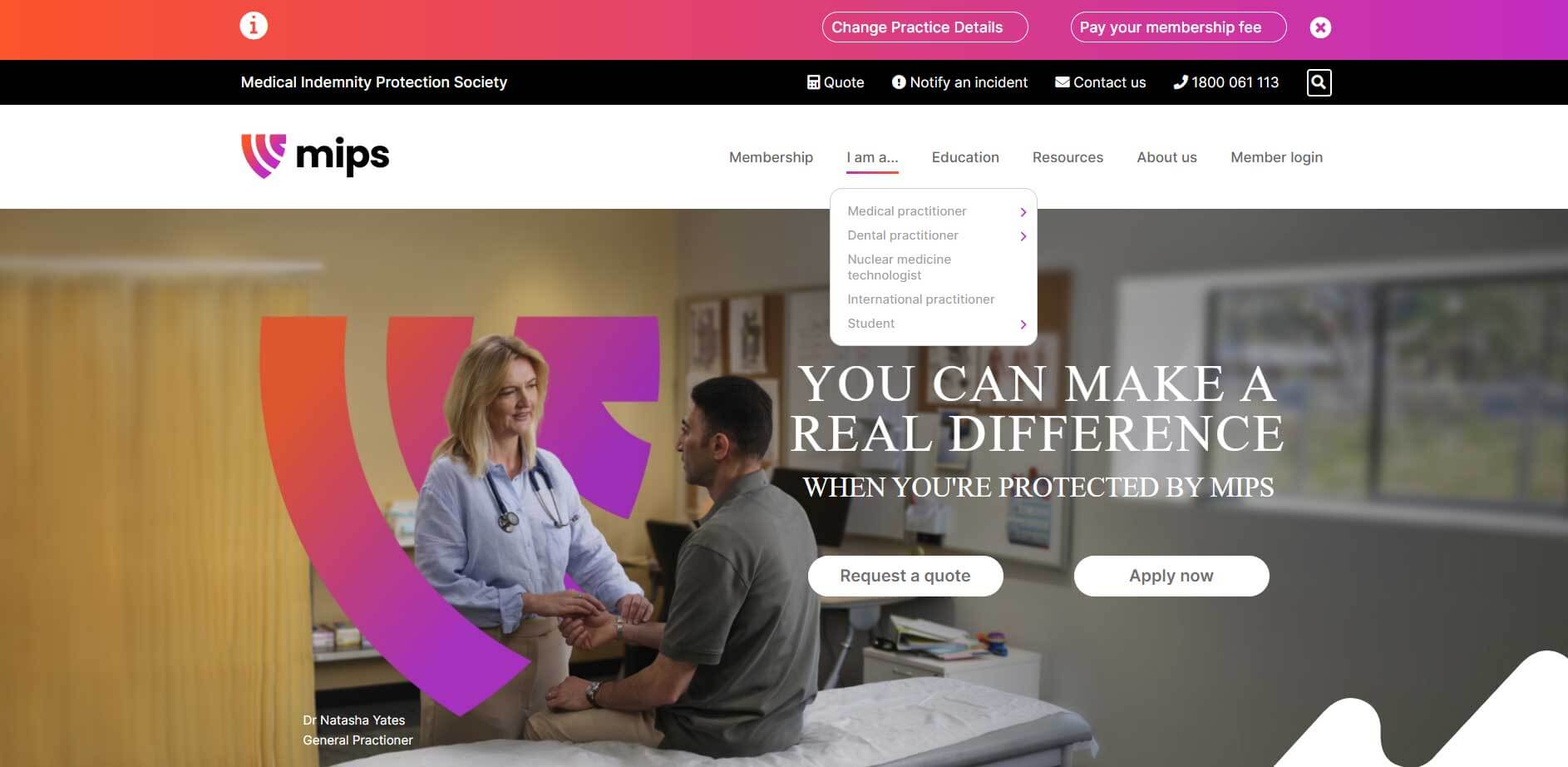
MIPS-Homepage

MIPS, for example, uses an intuitive user-centric navigation menu that makes it easy for their target audience, from medical practitioners and students, to find relevant information for their needs. 

2. Informative and Engaging Content

Great healthcare website designs are underpinned by content that is both informative and engaging. This means going beyond just presenting facts. It's about creating content that speaks to the needs and concerns of the audience, whether they are patients, healthcare professionals, or the general public. This could include health tips, informative articles, patient stories, and FAQs. The key is to provide value through content that educates, engages, and empowers users.

Content is the core of any great healthcare website design. To make it both informative and engaging, consider the following:

  • Quality Health Information: Provide well-researched, accurate, and up-to-date health information. Use layman's terms to explain medical jargon, making the content accessible to a broader audience.
  • Interactive Tools: Incorporate tools like symptom checkers, health risk assessments, or interactive guides. These tools engage users actively and provide personalised value.
  • Video and Webinar Content: Utilise video for patient testimonials, behind-the-scenes looks at healthcare facilities, or training and/or service videos. Videos can be a powerful tool for engagement and education.
  • Regularly Updated Blog: A blog with regular posts on health tips, news, and wellness advice keeps the content fresh and encourages repeat visits.
  • Infographics and Visual Aids: Use these to break down complex medical information into digestible, easy-to-understand formats.

3. Visually Appealing Layout

The best healthcare website designs don't just inform; they also appeal to the eye. A visually appealing layout with a clean, professional look instils confidence and trust in users. A well-designed website reflects the quality of care and attention to detail that is synonymous with the healthcare industry.

The visual appeal of a healthcare website plays a significant role in how users perceive it. To achieve a visually appealing layout, consider:


  • Consistent Branding: Use colours, fonts, and imagery that align with your brand's identity. This consistency helps in building trust and recognition.
  • Whitespace Usage: Adequate use of whitespace avoids clutter, making the website appear clean and organised, which is essential in a healthcare setting.
  • Quality Imagery: Use high-quality, relevant images that convey care and professionalism. Authentic photos of your facilities, staff, and patients can create a more personal connection.
  • Responsive Design: Ensure the design is responsive, meaning it adjusts seamlessly to different screen sizes and devices. This is crucial for providing a good user experience across all devices.
  • Legible Typography: Choose fonts that are easy to read and size them appropriately for headings, subheadings, and body text. Legibility is key, especially for users seeking important health information.
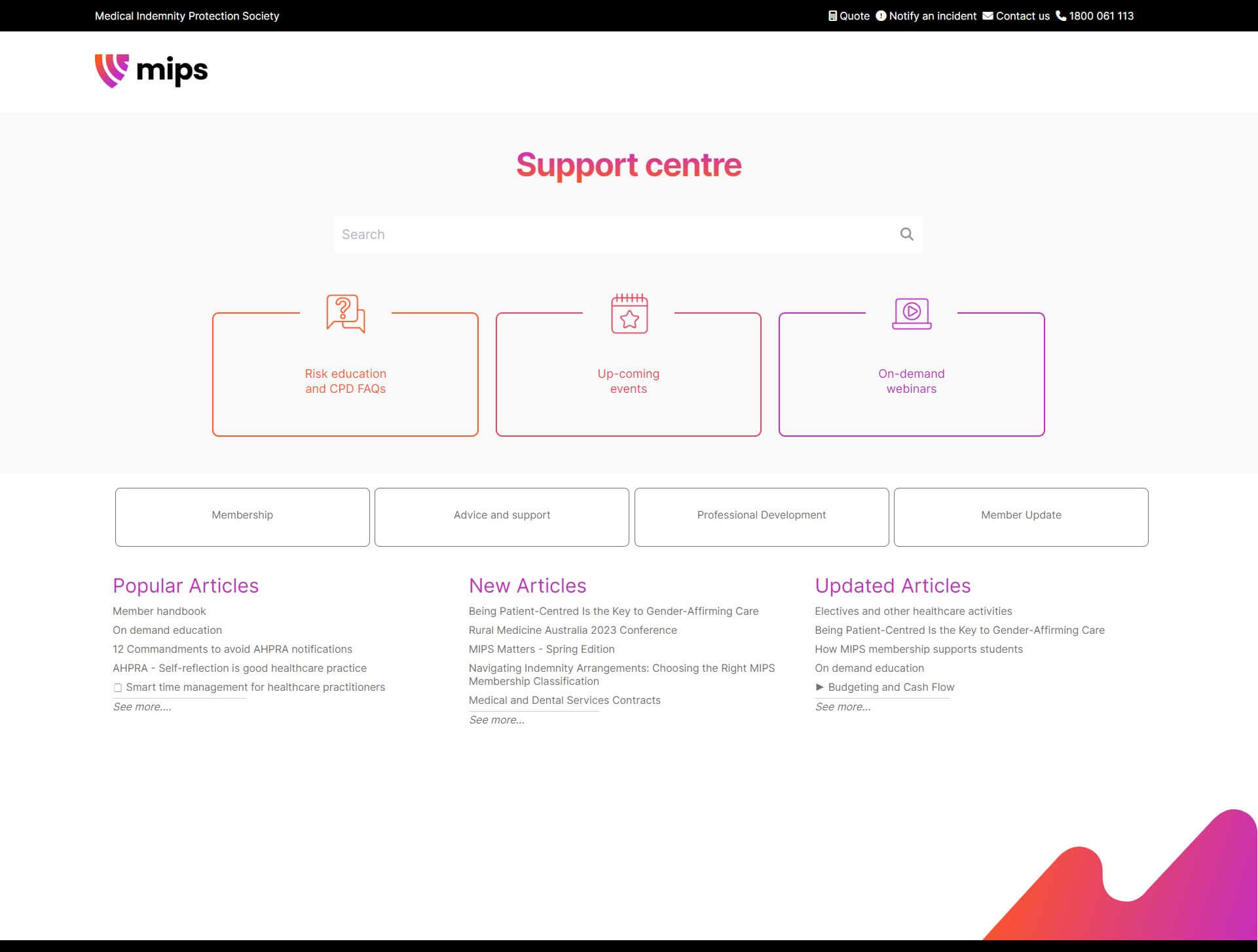
MIPS-support-centre

The MIPS website incorporates white space to make it easy to differentiate various sections in their Support Centre page, which is split into headings that clearly highlight and group categories.

4. Mobile-Friendly Design

With the increasing use of smartphones, a mobile-friendly design is essential for any top healthcare website design. A mobile-friendly website ensures that users can access vital healthcare information anytime, anywhere, which is particularly important in emergency situations.

Here are specific features and design elements that contribute to a mobile-friendly healthcare website:

  • Responsive Design: Employ a responsive web design that automatically adjusts the layout, content, and navigation based on the device being used. This ensures that the website is easily navigable whether on a desktop, tablet, or smartphone.
  • Touchscreen Navigation: Optimise navigation elements for touchscreen use, with buttons and links that are easy to tap. This includes spacing out links and making sure that interactive elements are adequately sized.
  • Fast Loading Speeds: Optimise images and streamline code to ensure quick loading times on mobile devices. Mobile users often have less patience for slow-loading pages, especially when seeking important health information.
  • Mobile-Friendly Content: Adapt content for mobile viewing. This might mean shorter paragraphs, bullet points, and mobile-optimised images and videos that load quickly and fit the screen size.
  • Accessible Contact Information: Make sure that contact information is easily accessible, with features like click-to-call for phone numbers.

MIPS-support-centre

The MIPS website is responsive and easy to read across various devices.

5. Data Security

In the healthcare sector, where sensitive patient data is frequently handled, data security is paramount. The best medical website designs incorporate robust security measures to protect user data.  

Here are key features to ensure data security:

  • SSL Certification: Use SSL certificates to encrypt data transmitted between the user's device and the website, ensuring that personal and medical information is secure. Encrypted websites will have https:// in front of their website URL.
  • Regular Software Updates: Keep all website software and plugins up to date to protect against known vulnerabilities.
  • Secure Patient Portals: If providing online access to patient records, ensure that the portal is secured with strong authentication methods and encryption.
  • Data Privacy Compliance: Adhere to relevant health data privacy regulations, such as the Health Insurance Portability and Accountability Act (HIPAA) in the U.S. or the Australian Privacy Principles (APPs), to ensure compliance with legal standards.
  • Regular Security Audits: Conduct regular security audits and penetration testing to identify and rectify potential security vulnerabilities.

Https website

6. Accessibility

Finally, accessibility is a critical component of successful healthcare website design. This means ensuring that the website is accessible to people with disabilities, such as those who rely on screen readers or have difficulty with fine motor skills.  

Ensuring that your healthcare website is accessible to all, including those with disabilities, is not just a legal requirement but also a moral obligation. Here are essential features to enhance accessibility:

  • Alt Text for Images: Use alternative text for images so screen readers can describe images to visually impaired users.
  • Keyboard Navigation: Ensure that the website can be navigated using a keyboard alone, which is crucial for users with certain physical disabilities.
  • Contrast and Font Size: Use high-contrast colour schemes for readability and offer options to increase font size.
  • Closed Captioning and Transcripts: Provide closed captioning for videos and transcripts for audio content, catering to users with hearing impairments.
  • Accessibility Testing: Regularly test your website with various accessibility tools and involve users with disabilities in testing to ensure the website is truly accessible. 

free resource

Website Redesign Best Practices Playbook

Download your free guide + checklist

Website Redesign Best Practices Playbook

How important is user-friendly design for a healthcare website?

User-friendly design is the single most important factor in whether a healthcare visitor stays on your site or leaves. A patient searching for a specialist, trying to book an appointment, or looking for after-hours information has no patience for confusing navigation or slow load times. The design needs to do the work so the visitor doesn't have to.

What does intuitive navigation look like in practice?

Navigation should follow the logic of your visitors, not your organisational chart. Most healthcare visitors arrive with one of three goals: find a service, contact someone, or access their account. The menu structure should make all three possible in two clicks or fewer.

Breadcrumb trails help users keep their bearings on deeper pages. A persistent search bar matters more on healthcare sites than almost anywhere else, patients often know what they need but don't know where to find it. And clear, high-contrast call-to-action buttons for "Book an appointment", "Contact us", and "Patient portal" should appear above the fold on the homepage.

Why does load speed matter more on healthcare websites?

Speed directly affects whether a patient completes a task or abandons it. This is not an abstract UX concern. Someone trying to access their test results or book an urgent appointment and facing a slow-loading page is experiencing a failure of care delivery, not just a technical inconvenience. Target under three seconds load time on mobile. Healthcare websites that fail Core Web Vitals thresholds also lose ground in Google search rankings, which compounds the problem.

What content does a healthcare website need?

Healthcare website content needs to be accurate, clear, and written for the person reading it, not for the organisation publishing it. Jargon-heavy pages written in passive clinical language lose readers fast. Plain English is not a dumbing-down. It's a respect for someone who is often anxious, time-poor, or in pain when they land on your page.

The most effective healthcare content combines several formats working together. Well-researched service pages that directly answer "do you treat what I have?", regularly updated health news, patient stories that build social proof (within AHPRA advertising guidelines), interactive booking tools, video content for provider introductions, and FAQs written for the questions patients actually ask, not the ones the clinical team assumes they ask.

What are AHPRA's rules for healthcare website content in Australia?

Australian healthcare providers advertising their services must comply with the AHPRA National Law and the Australian Health Practitioner Regulation Agency's advertising guidelines. The rules prohibit testimonials that refer to a practitioner's clinical practice, claims that could create unrealistic expectations, and the use of certain before-and-after imagery. Content teams building or refreshing a healthcare website need to check against these guidelines before publishing, not after.

Privacy obligations are separate. Under the Privacy Act 1988 and the Australian Privacy Principles (APPs), any website collecting health information including through contact forms, appointment booking, or patient portals must have a current, plain-English privacy policy and handle data in accordance with APP requirements. Australian data hosting is a legitimate and increasingly requested requirement for health sector clients.

Does visual design affect how patients perceive a healthcare organisation?

Yes, and the effect kicks in within seconds. Research on website credibility consistently shows that users form a visual impression before they read a single word. In healthcare, where trust is the whole game, a dated or cluttered design signals something about the organisation behind it. Clean layouts, consistent branding, and quality imagery all contribute to a patient's sense that they're in capable hands.

The strongest healthcare website designs share a few common traits. Whitespace keeps pages readable and reduces cognitive load for someone who may already be dealing with stress. Consistent colour palettes and typography across every page build a sense of reliability. Imagery should reflect the real people your organisation serves. Stock photos of overly cheerful patients in hospital gowns do the opposite.

Font size matters more on healthcare sites than most. Many of your visitors are older, fatigued, or reading on a small screen. Default body text should sit at 16px minimum. Heading contrast ratios should meet WCAG 2.1 AA requirements. Responsive design is not optional. A layout that breaks or reflows awkwardly on a phone will cost you patients.

Why does mobile design matter so much for healthcare websites?

Mobile is where most Australians now access health information, and healthcare website traffic reflects that. A mobile-first design approach means designing for the smallest screen first, then scaling up rather than building a desktop experience and shrinking it down. The results are meaningfully different.

On a well-designed mobile healthcare site, contact details are tappable. Booking forms are short and easy to complete with a thumb. Menu items are spaced far enough apart to tap accurately. Pages load in under three seconds. None of this is complicated to achieve, but it requires deliberate decisions at the design stage, not as an afterthought.

Mobile design checklist for healthcare websites
  1. Responsive layout that adapts cleanly to all screen sizes without horizontal scrolling.
  2. Tap-to-call buttons on all contact pages and in the header of key service pages.
  3. Booking forms with no more than five fields on mobile, with large touch targets.
  4. Images compressed for fast mobile load without visible quality loss.
  5. Patient portal login accessible from the mobile homepage with a single tap.
  6. Core Web Vitals passing scores. Target under 3 seconds LCP on mobile.


How should a healthcare website handle data security and patient privacy?

Data security on a healthcare website is a legal obligation before it's a design consideration. Australian healthcare organisations collecting any personal health information through their website including appointment requests, contact forms, or patient portal logins, must comply with the Privacy Act 1988 and the Australian Privacy Principles (APPs).

Under the Privacy Act 1988, health information is treated as sensitive information and attracts the highest level of protection under the Australian Privacy Principles. Any website collecting, storing, or transmitting health data must have a current privacy policy, obtain informed consent, and implement reasonable security measures.  Office of the Australian Information Commissioner
SSL certification (HTTPS) is the baseline every healthcare website must encrypt data in transit. Patient portals and member login areas need multi-factor authentication or strong session management. Regular security audits and penetration testing should be scheduled, not reactive.

Hosting location matters too. For government-adjacent healthcare organisations and those handling My Health Record data, Australian data hosting is a strong default position and increasingly a formal tender requirement. The CMS platform underpinning your website plays a direct role here. An enterprise-grade CMS with robust permission systems, audit logging, and regular security updates gives your IT team and your patients a much stronger foundation.

What accessibility standards apply to Australian healthcare websites?

Australian healthcare websites should meet WCAG 2.1 Level AA as a minimum. For government health agencies and organisations receiving government funding, compliance with the Web Accessibility National Transition Strategy means WCAG 2.0 AA is a formal requirement, not a recommendation.

Accessibility covers more than screen reader compatibility. It includes keyboard navigation for users who cannot use a mouse, sufficient colour contrast for low-vision users, captions and transcripts for all video content, and alt text for all images. Healthcare content reaches a wide age range such as an older patient with declining vision, a person with a cognitive disability navigating a mental health services page, a CALD community member using a translation browser extension. All of them are in your audience.

Accessibility issues to check before launch
  1. Images missing alt text descriptions, invisible to screen reader users.
  2. Form fields without properly associated labels, common in booking and contact forms.
  3. Low contrast between body text and background colours, particularly light grey on white.
  4. Videos published without closed captions or transcripts.
  5. Interactive elements such as dropdowns, modals, tabs, not operable by keyboard alone.
  6. PDFs linked as primary content that are not tagged for accessibility.
Testing should go beyond automated tools. Run your site through a screen reader. Invite users with disabilities to test key journeys. Accessibility audits should happen at launch and at every major redesign.

Should a healthcare website include telehealth and patient portal features?

Telehealth and patient portals have moved from added extras to expected features on Australian healthcare websites. With 90.3% of telehealth users saying they would use it again, patients who've experienced the convenience of a video consultation or online appointment management don't want to call a reception desk to do the same thing next time.

The decision isn't whether to offer these features. It's whether they live in a fragmented collection of third-party tools or in a unified platform that gives patients a consistent experience from first contact through to ongoing care.

What is the difference between a healthcare website and a patient portal?

Feature Public healthcare website Patient portal
Primary audience Prospective and existing patients, general public Existing patients and members only
Access Open, no login required Secure login required
Content Services, locations, health information, booking CTAs Personal health records, test results, appointments, secure messaging
Key functionality Navigation, SEO, conversion Data security, clinical system integrations, privacy compliance
Design priority Trust, clarity, ease of first contact Efficiency, familiarity, data accuracy


Many healthcare organisations need both. The website is the front door. The portal is what patients use once they're already in a care relationship. Building both on the same CMS platform, with single sign-on and consistent branding, reduces admin overhead, simplifies IT management, and gives patients a seamless experience.

The significance of a well-designed healthcare website in today's digital landscape cannot be underestimated.

As the first point of contact for many seeking health information or services, your website serves as the digital face of your healthcare organisation. It's an opportunity to demonstrate your commitment to quality care, accessibility, and patient satisfaction.

By focusing on these key elements, you can ensure that your website effectively communicates your message, engages your audience, and stands out in the competitive healthcare sector.

Beyond this, there are several digital workplace tools to assist you with providing more engaging experiences to your audience. For example, you can also consider thinking about the benefits of an intranet on healthcare delivery.

Need support with your project? Elcom has been delivering successful website, portals and intranets for the healthcare industry for over a decade. 

Whether you want to improve your employee experience and engagement, attract new clients, volunteers or funding, help frontline workers improve service delivery, or better support patients and families with more consistent and transparent communication; Elcom has you covered.

free resource

Website Redesign Best Practices Playbook

Download your free guide + checklist

Website Redesign Best Practices Playbook

How do you choose the right CMS for a healthcare website?

The right CMS for a healthcare website depends on what the organisation actually needs to do, not just today, but over the next five years. A platform that handles a simple service website fine will struggle when you need to add a patient portal, an online learning module for staff, and a telehealth booking integration.

A healthcare CMS should handle your public website, patient or member portal, and internal staff communications from a single platform. Managing three separate systems for three separate audiences creates content governance problems, security inconsistencies, and an IT burden that compounds over time.

Key questions to ask when evaluating a healthcare CMS
  1. Does it support secure patient or member portals with strong authentication, or does that require a separate platform?
  2. Where is data hosted? Australian hosting is a standard expectation for health sector procurement.
  3. Does the platform have a documented security model, regular update schedule, and support for SSL and MFA?
  4. Can non-technical staff publish and update content without IT involvement?
  5. Does it integrate with your existing clinical or business systems, or will you need custom development?
  6. What does the vendor's support model look like post-launch? A named contact beats a ticketing queue.
For Australian healthcare organisations, local CMS support matters in ways that offshore vendors often underestimate. Same-timezone availability for urgent issues, a team that understands Australian privacy law without needing a briefing, and a vendor who has already delivered compliant healthcare platforms locally — these are meaningful differences in a procurement decision.

Elcom's Digital Experience Platform has delivered websites, portals, and intranets for healthcare and health-adjacent organisations across Australia for over a decade. The platform handles website, portal, intranet, mobile app, and LMS from a single codebase, with Australian data hosting and in-house support included.

What does a complete healthcare website project look like?

A well-run healthcare website build follows a clear sequence. Rushing the early stages, particularly requirements gathering and content planning, is the most common reason healthcare website projects run over time and over budget.

How to plan a healthcare website project
  1. Define your audience segments and what each one needs to do on the site. Patients, carers, referrers, and staff often have very different requirements.
  2. Audit your existing content. Most healthcare sites have outdated pages, broken links, and duplicated information that needs to be resolved before migration.
  3. Confirm compliance requirements upfront e.g. Privacy Act 1988, APPs, AHPRA advertising guidelines, and WCAG accessibility standards.
  4. Map your integrations early. Booking systems, clinical platforms, My Health Record, and patient management software all need to be scoped before design begins.
  5. Build and test on real user journeys, not hypothetical ones. Involve actual patients in usability testing before launch.
  6. Plan for ongoing governance. Who owns content updates? Who approves new pages? A content governance model prevents the site from becoming stale six months post-launch.

Healthcare organisations that treat their website as a long-term asset with planned review cycles, regular content updates, and an ongoing CMS partner relationship, get substantially better results than those who treat it as a one-time project.

If you're at the planning stage, Elcom's team has delivered healthcare digital solutions including websites, member portals, and staff intranets across Australia. The enterprise website development guide and the CMS buyer's guide are both useful starting points for scoping a project.

Building the right digital foundation for your healthcare organisation takes the right platform and the right partner. Elcom has been doing both in Australia for over 25 years. Book a free consultation to talk through your project.

Deliver seamless digital experiences to your entire community

As the preferred technology partner for healthcare providers across Australia, Elcom is proud and privileged to support such an important industry.

See how Elcom can help

Frequently asked questions about healthcare website design

Keep reading

6 Things You Should Be Looking For in Your Intranet Provider 6 Things You Should Be Looking For in Your Intranet Provider

If you’re on the hunt for a new intranet solution for your organisation, you’ve likely experienced how truly complex the search can be. Here are the six essential factors to consider when making your ...

A Game-Changer: New SharePoint and Elcom Integration Capabilities A Game-Changer: New SharePoint and Elcom Integration Capabilities

Join us as we demo the new capabilities of the SharePoint Connector so you can see how the Elcom Platform can offer more value to your organisation.

10 Must-Have Features in an Enterprise Web CMS 10 Must-Have Features in an Enterprise Web CMS

Discover the 10 essential features to look for in an enterprise web CMS. Learn how to choose a platform that supports scalability, security, and digital transformation.

Creating a Winning Digital Customer Experience Creating a Winning Digital Customer Experience

Learn how to create personalised, seamless digital customer experiences that captivate and convert your audience. Plus bonus templates to help you get started.

Scroll to top