In the information and digital age, knowledge is a key competitive advantage.
In this blog post, we'll explore the benefits of knowledge management systems and how they can help organisations.
We’ll also look at how incorporating your knowledge management system into your intranet can help you significantly improve their internal communication, collaboration, and productivity.
What is Knowledge Management?
Knowledge management, as many of you would know, is about harnessing the collective wisdom and experience within an organisation to drive growth, innovation, and efficiency.
Knowledge management systems provide a centralised platform for employees to access, share, and collaborate on information, making it easier to find answers, solve problems, and drive better business outcomes.
In addition, a survey by Deloitte found that 80% of organisations believe that effective knowledge management is essential to achieving their business objectives. Yet, despite the clear benefits of knowledge management, many organisations struggle to implement and maintain an effective system.
Further reading:
What Makes a Good Knowledge Management System?
The modern business landscape thrives on information - a never-ending stream of data, ideas, experiences and insights. The difference between success and stagnation often hinges on how effectively a company can harness and manage this knowledge.
Enter the Knowledge Management System (KMS), your organisation’s solution for efficient knowledge capture, organisation, sharing, and utilisation. But what makes a good KMS? Read on for some practical tips and recommendations.
1. Content Creation
A superior KMS should provide a flexible platform for creating, editing and publishing varied forms of content - be it documents, videos, or any other resources. It should empower every member of your team to contribute their expertise. Encourage a culture of content creation within your organisation by providing incentives and recognition for active contributors.
2. Content Organisation
Ease of use is paramount when it comes to organising content. A good KMS allows users to categorise, tag, and search for content intuitively. Consider implementing a system that uses both broad categories and specific tags, allowing users to locate the desired content quickly and efficiently.
3. Content Sharing
Knowledge is power, but only when it's shared. Your KMS should facilitate easy sharing across teams, departments and even with external stakeholders such as clients or partners. Keep an eye on user access permissions to maintain control over sensitive information while promoting a collaborative environment.
4. Collaboration
An ideal KMS fosters a spirit of collaboration, letting users work together on projects, share feedback and contribute to shared content. Features like real-time editing, discussion boards and suggestion systems can make your KMS a hub of innovation and cooperation.
5. Analytics and Reporting
Insights derived from data and analytics can reveal a lot about your content's usage, engagement, and effectiveness. Ensure your KMS comes with robust analytics capabilities to help you track and optimise the system over time, ensuring it continually meets your organisation's evolving needs.
6. Security and Access Control
Security is non-negotiable. Your KMS should have robust security features to protect sensitive information. In addition, the system should allow administrators to control user access and permissions effectively, ensuring each user has access to relevant information while safeguarding confidential data.
7. Integration
Integration is key to maximising efficiency. Your KMS should seamlessly integrate with other business systems like Customer Relationship Management (CRM) or Enterprise Resource Planning (ERP) software, creating a unified platform for all business operations.
8. User Adoption and Training
No system can succeed without user buy-in. Ensure your KMS is user-friendly and provides comprehensive training and support to help users understand and utilise the system effectively. Regularly collect user feedback to make necessary improvements and keep user satisfaction high.
9. Measurement
Lastly, be sure to monitor the performance of your KMS regularly. Are users adopting the system? Is it making information more accessible and promoting collaboration? Are there areas of improvement? Regular assessment helps ensure your KMS continues to serve your organisation effectively.
Knowledge Management System Benefits
There are many benefits of knowledge management systems.
1. Increased Efficiency and Productivity
By providing quick and easy access to information and expertise, a knowledge management system can help employees perform their job tasks more efficiently and effectively, reducing the time and effort required to complete projects and achieve organisational goals.
A KMS streamlines workflows and eliminates time wasted searching for information, resulting in increased efficiency and productivity throughout the organisation. Here's how:
- Rapid Access to Information: With a centralised knowledge repository and powerful search functionality, employees can quickly find relevant information, documents, and resources, reducing time spent on manual searching and enabling them to focus on critical tasks.
- Standardised Processes and Best Practices: A KMS provides a platform to document and disseminate standardised processes, guidelines, and best practices. This ensures consistency, eliminates redundant efforts, and helps new employees ramp up quickly, leading to greater efficiency.
- Reduced Repetition and Duplication: By capturing and sharing knowledge effectively, a KMS prevents employees from reinventing the wheel. Lessons learned, solutions to common problems, and valuable insights can be documented and readily accessed, saving time and effort across the organisation.
2. Improved Collaboration and Communication
A knowledge management system can facilitate collaboration and communication among employees by providing a platform for sharing ideas, feedback, and best practices. This can help foster a culture of teamwork and innovation within the organisation.
With a knowledge management system in place, employees have access to accurate and up-to-date information that can help inform their decision-making processes. This can lead to better and more informed decisions, ultimately benefiting the organisation as a whole.
A KMS fosters collaboration and enhances communication among teams, departments, and even geographically dispersed employees. Here's how it facilitates improved collaboration:
- Knowledge Sharing and Expertise Location: By providing knowledge sharing tools such as discussion forums, wikis, and collaborative workspaces, a KMS enables employees to share ideas, insights, and expertise. This creates a culture of collaboration, breaks down silos, and promotes cross-functional learning and problem-solving.
- Enhanced Communication Channels: Integrating communication tools within a KMS, such as chat platforms or commenting features, encourages real-time communication and feedback. This reduces email overload, streamlines communication, and keeps everyone connected and informed.
- Remote Collaboration: With mobile compatibility and remote access, a KMS facilitates seamless collaboration among on-site and remote employees. It bridges geographical barriers, enabling teams to work together effectively regardless of their location or time zone.
3. Increased Innovation and Creativity
By enabling employees to share and access knowledge and expertise, a knowledge management system can help drive innovation and creativity within the organisation.
A well-implemented KMS can be a catalyst for innovation and creativity within organisations. Here's how it drives these important aspects:
- Idea Management and Collaboration: A KMS can include features such as idea management tools or innovation hubs, where employees can contribute, discuss, and refine ideas. This encourages a culture of innovation, taps into collective intelligence, and unlocks creative potential across the organisation.
- Knowledge Transfer and Learning: By capturing and sharing knowledge, a KMS facilitates organisational learning. Lessons from past experiences, industry trends, and external research can inspire new ideas, spark innovation, and help employees stay ahead in their fields.
- Collaboration Beyond Boundaries: A KMS breaks down hierarchical and departmental barriers, allowing employees at all levels and from different functions to collaborate and contribute their unique perspectives. This cross-pollination of ideas fosters creativity, generates new insights, and fuels innovation.
Knowledge Management Implementation Example
Signs of Safety Knowledge Bank
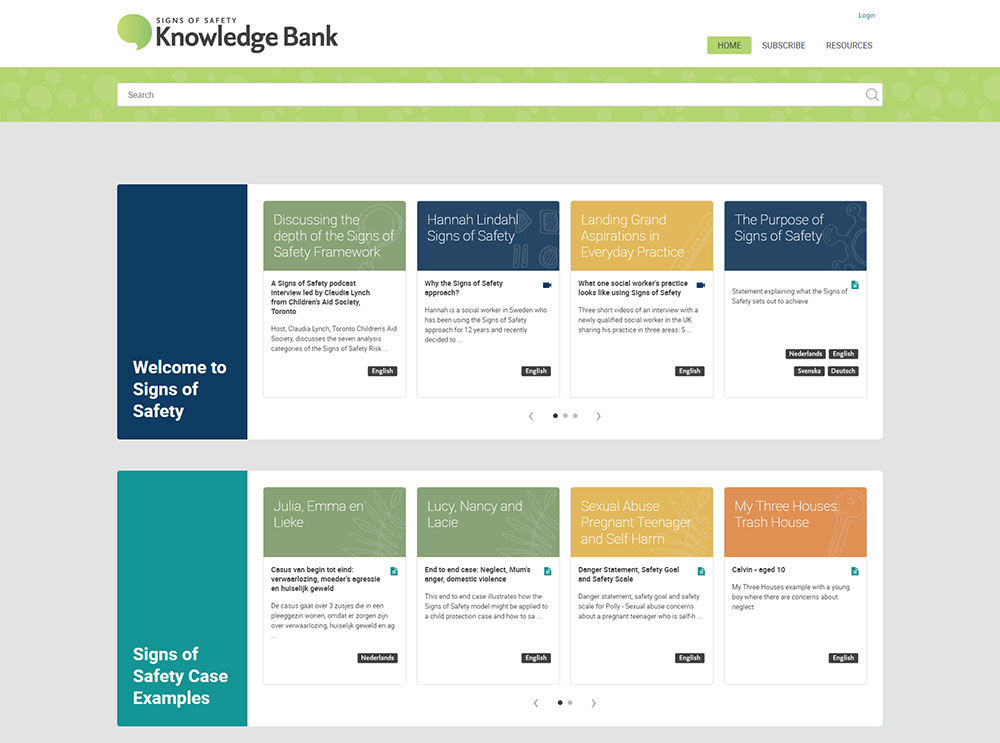
The Signs of Safety Knowledge Bank, is an online platform created by the Elia Group, showcases how a KMS can radically transform an organisation's information management, boost efficiency, and foster collaboration. It's an exceptional example of a KMS that's not just well-designed, but also well-utilised.
The public access version offers a selection of introductory resources, including Signs of Safety Gathering videos, is available to everyone for free. The subscription access offers over 900 additional resources for subscribers.
A User-Centric Approach
From the get-go, the Elia Knowledge Bank places the user at its heart. The intuitive interface, straightforward navigation and mobile compatibility make it easy for users to engage, whether they're in the office or on the go. A particular standout is the "New to Signs of Safety?" section, which guides newcomers through the platform's rich content with ease.
Rich Content Repository
The Elia Knowledge Bank boasts a wide array of content forms – articles, videos, and interactive resources. The ‘Library’ section, for example, is a treasure trove of varied content, catering to every learning style. Further, the ‘Submit your Work’ feature enables a continual influx of fresh content from users, making it a dynamic knowledge hub.
Collaboration-Friendly Features
The platform goes beyond content storage to foster a vibrant community. A prime example is the ‘Discuss’ feature under each resource. Users can comment, ask questions, and share insights, turning each content piece into a catalyst for dialogue and idea exchange.
Integrated Search Function
The Elia Knowledge Bank transforms the often daunting task of information retrieval into a simple process. The platform's powerful search bar, coupled with efficient tagging and categorisation, ensures users find what they're looking for quickly and accurately. For instance, content is classified under various 'themes' like Practice, Implementation, and Leadership, streamlining search results.
Learning and Growth
The platform isn't just a content repository; it's a catalyst for growth. The 'Learning Programme' section offers curated resources that help employees improve their skills and stay updated with industry trends. From training videos to comprehensive reading lists, it's a go-to spot for professional development.
Security and Control
The Elia Knowledge Bank strikes a perfect balance between openness and control. User permissions and access controls protect sensitive information while promoting knowledge sharing. A noteworthy feature is the ‘Members’ area, which ensures that certain resources are accessible only to registered users, safeguarding the integrity of the content.
The Elia Knowledge Bank epitomises how a KMS can be a cornerstone of an organisation's knowledge management strategy. Its user-centric design, rich content repository, collaboration-friendly features, efficient search function, focus on learning and robust security all coalesce to turn information overload into a strategic advantage.
How a Knowledge Management System Fits in with an Intranet
Intranets have long been the digital epicentres of large organisations, connecting dispersed teams and centralising resources. While they serve numerous functions, from fostering corporate culture to streamlining workflows, one function stands out in the modern era: Knowledge Management.
As we navigate an age where information is both an asset and a challenge, integrating a KMS within the intranet framework can be incredibly beneficial.
1. The Evolving Role of Intranets
Initially, intranets were primarily communication tools. They relayed top-down information, hosted important documents, and occasionally, featured a noticeboard. Fast-forward to today, and intranets have transformed into dynamic digital workplaces.
The onus isn't just on information dissemination but on knowledge creation, sharing, and application. This shift has paved the way for the integration of the functions of a traditional standalone KMS into the intranet functionality.
2. KMS: The Heart of Modern Intranets
At its core, a KMS facilitates the collection, organisation, sharing, and retrieval of knowledge. When embedded within an intranet, it ensures that this knowledge isn’t siloed but is actively accessible to all relevant stakeholders.
Within the intranet framework, the KMS acts as a unified hub where data from various departments is stored, categorised, and tagged. Be it sales insights, marketing collateral, HR policies, or R&D documentation – everything finds a structured home.
Let's discuss this in more details.
Finding Knowledge Fast
One of the key challenges in knowledge management is information discoverability.
- Searchability: The powerful search capabilities within intranets ensure that users can find the right information efficiently, harnessing tools like semantic search, filters, and predictive text.
- Knowledge Hubs: Intranets centralise knowledge. Often you'll find knowledge hub sections which collate certain information. This can be refined and filtered as needed.
Access Control and Security
While sharing is encouraged, it’s equally crucial to maintain the sanctity of sensitive information. Within an intranet, the KMS can employ sophisticated access controls.
- Role-based Access: Depending on job roles and responsibilities, access to certain knowledge bases can be restricted or granted.
- Audit Trails: Monitor who accessed what information and when, ensuring a layer of accountability.
Knowledge Renewal and Training
Within the dynamic landscape of businesses, knowledge isn’t static. It needs periodic updates and renewals. Integrating a KMS within an intranet aids in this continuous learning process.
- E-learning Modules: Training programs, webinars, and workshops can be hosted, ensuring employees are always equipped with the latest knowledge.
- Feedback Mechanisms: Users can provide feedback on existing knowledge assets, flagging outdated information or suggesting enhancements.
Driving Employee Engagement
An intranet’s success isn’t just in its features but its usage. By weaving a KMS within, it ensures that employees are not just passive consumers but active contributors.
- Gamification: Reward employees for sharing insights, resolving queries, or even for accessing training modules, turning knowledge management into an engaging endeavour.
- Personalised Dashboards: Tailored content ensures that employees always find relevance, driving frequent intranet visits.
What Next?
Inspired to transform your organisation's knowledge management? Contact us at Elcom. We'd love to help you create a tailored KMS that empowers your team and drives your business forward.