Do you provide specific support for your remote workforce?

We know that remote and hybrid working is here to stay thanks to the pandemic as well as wider social changes, but one question we hear over and over from business leaders is how to most effectively manage a remote workforce

On the upside, remote employees are more engaged, more likely to stay with their employer and enjoy a better work-life balance when they have the chance to work from home – but they can also find collaboration, communication and motivation difficult. Those working from decentralised locations and away from the office may also experience similar remote work barriers.

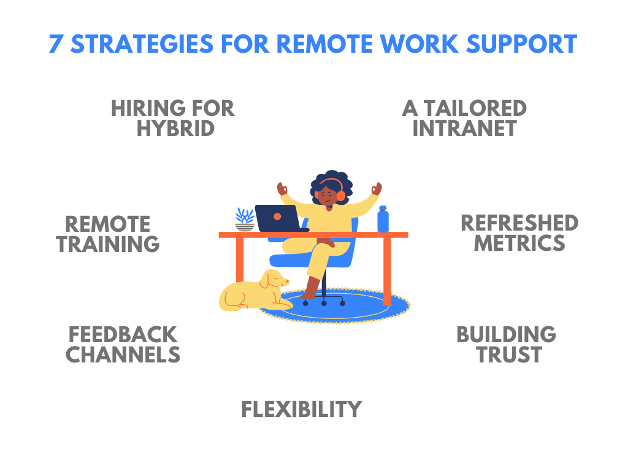
These seven key strategies cover essential aspects for a better-supported and better-connected remote workforce in 2026.

7 Strategies for Remote Work Support

1. Get the Right Communication and Collaboration Systems in Place

A DocuSign survey of 2,008 office workers around Australia found that just 32% feel more connected to their colleagues when they’re working from home compared to the office. If you haven’t already, it’s time to focus on your intranet communication software so remote workers feel better connected. In this new hybrid workforce era, being able to easily collaborate and communicate benefits everyone – whether they’re fully remote, working full-time in the office or a mixture of both.

The right intranet solution can replicate real-world collaboration environments for remote workers, via project and topic-based work spaces.

The right intranet solution can replicate real-world collaboration environments

FREE GUIDE

Internal Communications Best Practices

5 critical communication areas to focus on

Internal Communications Best Practices

2. Revisit Your Performance Metrics

Key Performance Indicators are a highly effective way to measure individual and organisational performance, but these may not be as relevant if the team or individual has made a recent shift to remote work. Refreshed metrics can better reflect how successfully people are really working at home. They’ll also help to set clear expectations for employees, so they know exactly what’s expected of them.

Consider setting some wider KPIs focused around communication and self-discipline to set the foundation for successful remote work, as well as reconsidering the KPIs relating to the individual’s role. Remember that KPIs should be SMART: specific, measurable, attainable and time-based.
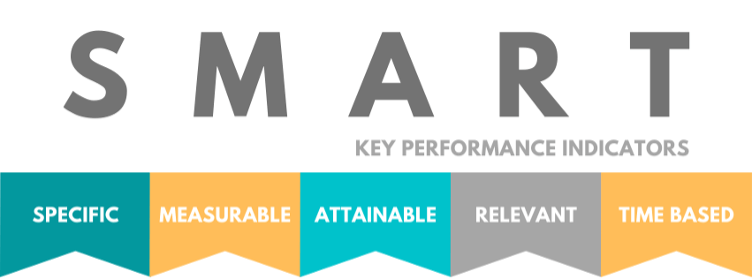
Smart Objectives - Key Performance Indicators


Below are some practical examples of performance metrics for remote teams:

Example 1: Productivity-Based Metrics
These metrics track the overall output of remote employees based on their role and responsibilities.

  • Output per hour (Oph): Measures the amount of work completed per hour worked. For example, this could apply to tasks such as writing blog posts, completing coding sprints, or processing customer support tickets.
    Example Metric: "Complete 5 support tickets per hour, with an 85% satisfaction rating from customers."
    Why it’s effective: It focuses on measurable outcomes rather than input-based hours worked.
  • Task completion rate: Tracks how many tasks are completed on time versus how many are overdue.
    Example Metric: "Complete 95% of assigned tasks within the set deadlines."
    Why it’s effective: Keeps teams on track without micromanaging.

Example 2: Quality-Based Metrics
These metrics focus on the quality of the work being produced and the value delivered.

  • Customer satisfaction score (CSAT): Measures how satisfied customers are with the product or service provided, often through post-interaction surveys or feedback.
    Example Metric: "Achieve a minimum CSAT score of 4.5 out of 5 on customer service interactions."
    Why it’s effective: Keeps remote workers focused on delivering high-quality work that meets or exceeds customer expectations.
  • Error rate: Measures the number of mistakes or revisions that need to be made to a task or project after submission.
    Example Metric: "Keep the error rate under 2% for all project deliverables."
    Why it’s effective: Encourages attention to detail while promoting accountability.

Example 3: Collaboration and Communication Metrics
Since remote work relies heavily on digital communication, these metrics evaluate how well employees are collaborating and communicating across teams.

  • Response time to emails/chats: Tracks the average time taken to respond to internal communication.
    Example Metric: "Respond to 95% of internal emails and messages within 24 hours."
    Why it’s effective: Sets expectations for communication speed, ensuring teams stay responsive and connected.
  • Cross-department collaboration: Measures the number of collaborations with other teams, such as attending interdepartmental meetings or contributing to cross-functional projects.
    Example Metric: "Participate in at least two cross-departmental meetings or collaborative projects per quarter."
    Why it’s effective: Fosters team synergy and ensures alignment across functions, even in a remote environment.

Example 4: Engagement Metrics
Measuring employee engagement is critical, especially when teams are remote and may feel disconnected from the company culture.

  • Employee engagement score: This score is typically measured via surveys assessing factors like motivation, satisfaction, and sense of belonging.
    Example Metric: "Achieve an employee engagement score of at least 80% on quarterly surveys."
    Why it’s effective: Reflects how well employees are connecting with their work and the company, which can directly impact retention and productivity.
  • Participation in company-wide events: Tracks how often employees engage in virtual events like team-building activities, wellness programs, or webinars.
    Example Metric: "Encourage 80% of the team to attend at least one company-wide virtual event per month."
    Why it’s effective: Boosts morale and fosters a sense of community among remote workers.

Example 5: Time Management and Availability Metrics
Remote work can blur the lines between personal time and work time. These metrics can help ensure employees are managing their time effectively.

  • Time to complete high-priority tasks: Measures how quickly remote employees are able to tackle urgent or high-priority tasks.
    Example Metric: "Complete high-priority tasks within 4 hours of being assigned, with a 95% success rate."
    Why it’s effective: Tracks responsiveness to urgent tasks, ensuring remote employees remain productive when deadlines are tight.
  • Availability during core hours: Ensures that remote employees are available and present during agreed-upon core working hours for team collaboration.
    Example Metric: "Be available for 90% of scheduled meetings or collaboration sessions during core hours (e.g., 10:00 AM – 3:00 PM)." Why it’s effective: Encourages real-time collaboration and ensures teams don’t miss important discussions despite working remotely.

Example 6: Learning and Development Metrics
Remote workers may miss out on informal learning opportunities, so tracking their growth is important.

  • Training completion rate: Tracks the completion rate of assigned training modules or courses.
    Example Metric: "Complete 100% of mandatory product knowledge and compliance training within 30 days of being hired."
    Why it’s effective: Ensures employees stay up-to-date with necessary skills, especially when working remotely and relying on digital learning tools.
  • Skill improvement tracking: Measures the improvement in specific skills over time, such as communication, technical abilities, or sales techniques.
    Example Metric: "Achieve a 10% improvement in sales conversion rate over 3 months through ongoing product training and coaching."
    Why it’s effective: Keeps remote employees focused on growing professionally and staying competitive in their roles.

3. Focus on Flexibility for Staff

Remote work has provided several benefits: in a Salesforce survey, 66% say remote working has brought them closer to their families. Employees say they’ve enjoyed a better work-life balance working from home, but this balance can also require a more open-minded approach to when and where employees might be working. 

After all – if the job’s getting done and done right, does it matter if an employee wants to split their workday into early morning and evening work sessions?

There’s been somewhat of a shift occurring in the employment landscape where 76% of Australians are willing to stay longer with their employer if they offer flexible working conditions, and over half are willing to take a pay cut for an more flexible working schedule. Organisations that fail to keep up with this shift could really find themselves on the back foot when it comes to hiring, so keep this in mind when developing support for remote workers.

Actionable tip: Offer options such as flexible start and finish times, and periodically review policies to ensure they align with employee preferences and business objectives.

4. Build a Sense of Trust for Remote Teams

An effective digital workplace also requires a healthy sense of trust, both from leadership and amongst remote teams. The instinct might initially be to put employee monitoring software and keyboard tracking into place – but for the most, part Big Brother doesn’t need to be watching over remote staff. Instead, develop those important performance metrics and focus on fostering high employee trust and engagement, which can have profound benefits for employee loyalty and productivity.

Some ways of fostering trust in your remote teams can include:

  • Setting expectations
    By providing clear objectives daily on each employee’s personalised dashboard, on both an individual and organisational level
  • Encouraging collaboration & accountability
    By building virtual workspaces around projects and topics so workers can work together easily and in a shared setting
  • Leading by example
    By maintaining a virtual presence from key leadership via video messages and comments, to maintain motivation and celebrate wins
  • Unwinding together
    By celebrating special days and events on video chat or your intranet noticeboard
  • Touching base regularly
    By checking in with teams daily or weekly, depending on how experienced the team is with remote work.
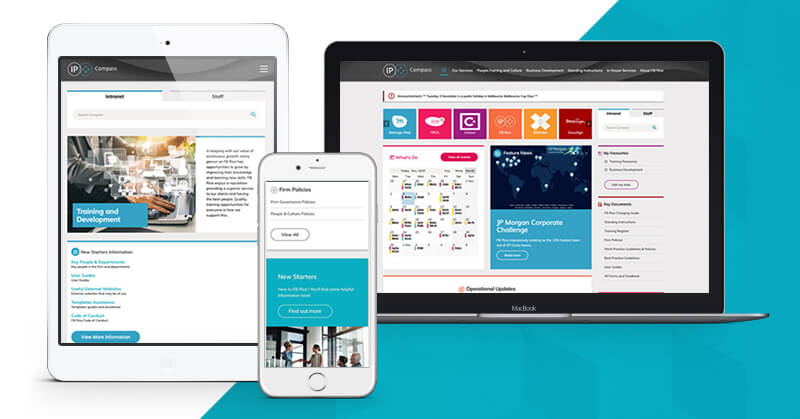
The Elcom team, for example, developed a new intranet for leading intellectual property firm FB Rice that compiles useful team information such as staff codes, photos and whether someone is out of the office at that time. These types of features, as well as the ability to share and celebrate organisational successes, has helped to connect staff working from different offices and from home.

I’m really pleased with our intranet and am happy we implemented the Elcom solution. The consensus is the intranet is a real positive for people, helping to support our practices and the firm. It has given us what we needed, and I can’t see how you can improve on that.

Judy Ryan
Project Manager
FB Rice

Read the case study

5. Hire with Hybrid in Mind

One of the brilliant aspects about a remote or hybrid workforce is that your recruitment pool opens up to far beyond that of the local area – there’s literally a world of expertise and skillsets out there to be found! Plenty of organisations are taking the chance to build up a diverse talent pool with a focus on technology skills, which not only supports existing staff but benefits the organisation as a whole. Just remember that:

  • The right intranet communication software is essential so your new talent won’t be sitting idly by.
  • Virtual hiring capabilities may be an important consideration to help you hire effectively from afar.
  • Learning Management System (LMS) can help train new hires and get them up to speed efficiently.
Free webinar

From Invisible to Invaluable: Optimising Internal Comms ROI in FY26

A proven framework for success

From Invisible to Invaluable: Optimising Internal Comms ROI in FY26

6. Invest in Remote Training

While we’re on the subject of training, it’s worth noting that an effective LMS can benefit your entire team as well as new hires. The right intranet design with inbuilt LMS can provide a training hub for everything from onboarding to ongoing professional development and upskilling.

Employees working from home can sometimes feel like their career is on pause – but this doesn’t need to be the case with a specific remote learning and development strategy in place.

Remote employees are able to work through courses at their own pace, easily find related resources and access relevant staff details for any one-on-one questions about what they’re learning. 

This type of effective remote learning can truly help to future-proof your workforce, whether remote working is part of your short-term or long-term plans.

Also consider micro-learning, which has become a key trend in 2026, offering short, focused learning modules that employees can complete at their own pace. This approach ensures that training is accessible, engaging, and effective for busy remote workers.

Actionable tip: Implement micro-learning platforms that deliver bite-sized, interactive training sessions, and supplement these with access to webinars, online courses, and mentoring opportunities.

7. Build Reliable Feedback Channels

Gathering regular feedback from employees is critical when they’re working from home or from decentralised locations, because even small problems can quietly snowball if they’re not addressed in a timely way. Consider asking your remote workers what could make their workday easier and more productive. For example:

  • Would mid-morning meetings suit some people so they can pick their kids up from school?
  • Would certain teams prefer to block out several hours a day for high-focus work?
  • Could certain forms or HR processes be automated to save time and improve accuracy?

By requesting this type of information via intranet surveys or a digital “suggestion box”, you could identify important insights to boost remote employee engagement and productivity.

For further tips on supporting your remote workers, why not grab a coffee and watch our webinar on this subject? It covers the key areas you mustn’t overlook when setting up your digital workplace, as well as important long-term strategies.
If you’re currently looking to improve or overhaul your intranet communication software, Elcom offers the proven platform and specialist team to build your truly connected digital workplace. Schedule your free consultation today.

Video insights

How to Efficiently & Effectively Support a Remote Workforce

  • The 3 pillars of effective remote working
  • Key areas you must not overlook when setting up your digital workplace
  • How to support the immediate needs of your remote workforce
  • What you need to do to support your remote workforce long-term

Watch the recording

Keep reading

The Role of an Intranet in Supporting Hybrid & Remote Work The Role of an Intranet in Supporting Hybrid & Remote Work

Learn how an intranet supports hybrid and remote teams by enhancing communication, collaboration, and engagement for seamless connectivity and productivity.

Working from Home: The Hybrid Workforce Is Here to Stay Working from Home: The Hybrid Workforce Is Here to Stay

Remote and hybrid working is the new normal, and now’s the time to be updating employee intranet software and remote working policies in order to support teams.

Essential Tools for Successfully Managing a Hybrid Workplace Essential Tools for Successfully Managing a Hybrid Workplace

Want to create a more efficient and productive hybrid workplace? Check out our list of essential hybrid tools, from communication to project management.

Scroll to top